Index
Automated Excel-Report via eMail
Automated Excel-Report via eMail (scroll to top)
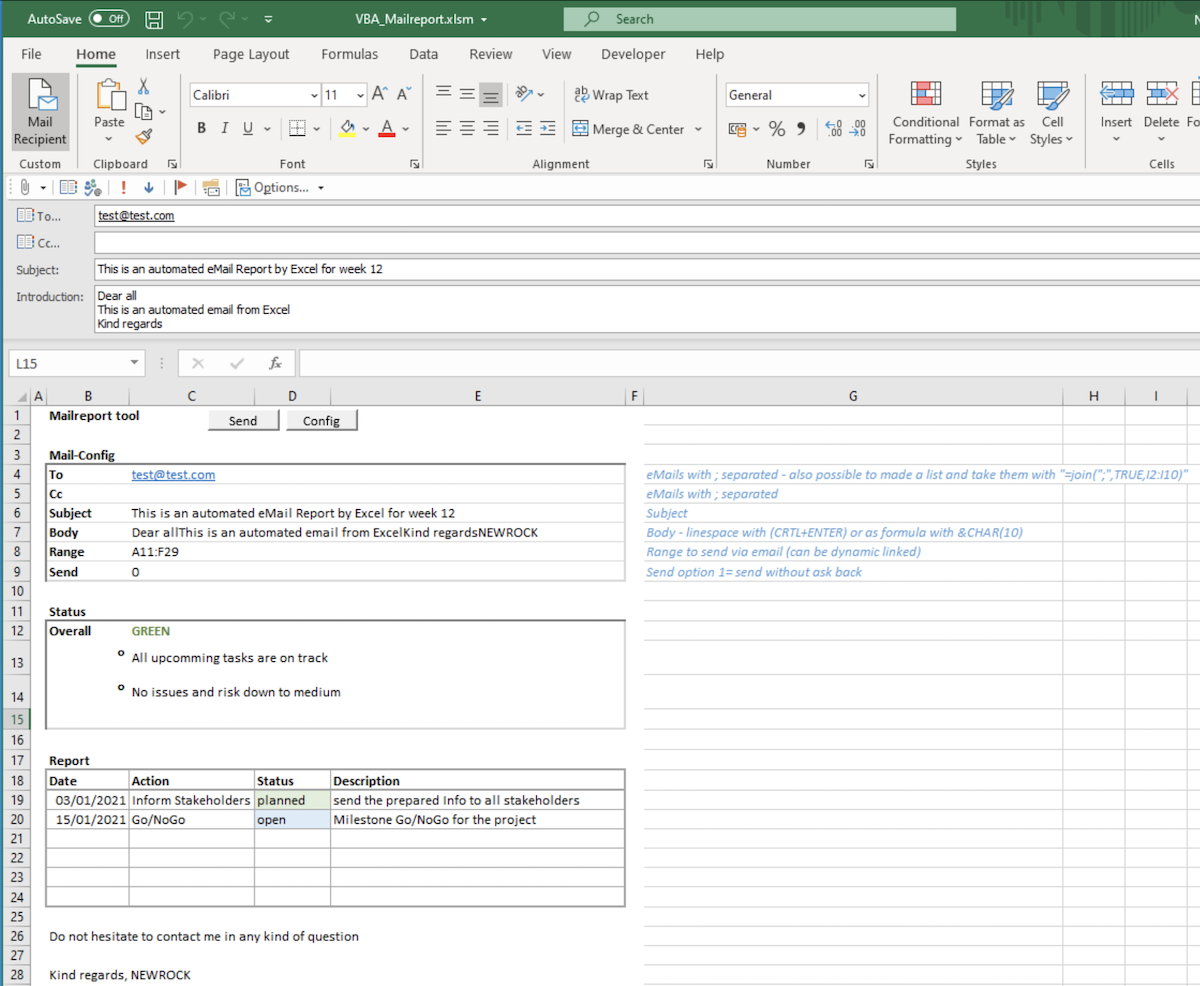
Made a new Excel and save it as xlsm (including code)
Add the below listed 3 procedures in a module
Add on a sheet (tab) two buttons liked to "SendMailReport" and "ShowHideMailConfig"
Below design your report as wished - there are no limits
Download - ExampleExcelMailReport.zip
Procedure to read the definitions for the Mail
Sub SendMailReport()
    ' Read definitions in a sheet and send based on it an area via mail
    ' The config is expected to start with the keyword "Mail-Config", with values below in the column right in the following order:
    '       Mail-Config
    '       To              valid Mailaddresses separatet by ;
    '       Cc              valid Mailaddresses separatet by ;
    '       Subject:        Subject of the eMail
    '       Body Text:      Text (no formating possible) on top of the send area
    '       Range to send:  Range in the form A12:E20
    '       SendStat:       1=send without ask back
    Dim objRange As Range
    Dim bytColVal As Byte, bytRowMailConfig As Byte, bytCConfig As Byte, bytNConfig As Byte
    Dim strConfigKey$
    Dim arrMailConfig$()
    bytCConfig = 6  ' how many config parameter
    strConfigKey$ = "Mail-Config" ' Key word in the row above the config and the column left of the values
    Set objRange = ActiveSheet.Cells.Find(What:=strConfigKey$, lookat:=xlWhole)
    If objRange Is Nothing Then
        MsgBox "Cell with '" & strConfigKey$ & "' not found to be able to read the mail configuration"
        Exit Sub
    Else
        bytColVal = objRange.Column + 1
        bytRowMailConfig = objRange.Row
    End If
    ' Dim variables static definitions
    ReDim arrMailConfig$(bytCConfig)
    For bytNConfig = 1 To bytCConfig
        arrMailConfig$(bytNConfig) = ActiveSheet.Cells(bytNConfig + bytRowMailConfig, bytColVal).Value
    Next
    ActiveSheet.Range(arrMailConfig$(5)).Select
    SendByMail arrMailConfig$(1), arrMailConfig$(2), arrMailConfig$(3), arrMailConfig$(4), CByte(arrMailConfig$(6))
    Set objRange = Nothing
End Sub
Simple Mailsender (not much validation - but easy to add if required)
Sub SendByMail(Optional strTo$, Optional strCc$, Optional strSubject$, Optional strBody$, Optional bytSend As Byte)
    ' Send an Mail with the Excel send mail function
    ' if strTo is empty it will ask for the TO Mail
    If strTo$ = "" Then
        'strTo$ = InputBox("Insert T-number's" & vbNewLine & "(separaded by ;)", "Mail to")
        'If InStr(1, strTo$, "@") = 0 Then
            bytSend = 0
        'End If
    End If
    ActiveWorkbook.EnvelopeVisible = True
    With ActiveSheet.MailEnvelope
        .Introduction = strBody$
        With .Item
            .To = strTo$
            .Cc = strCc$
            .Bcc = ""
            .Subject = strSubject$
            .Display
            If bytSend = 1 Then
                .send
            End If
        End With
    End With
End Sub
Show/Hide the configuration rows
Sub ShowHideMailConfig()
    ' Show or Hide the rows with the config for the mail
    Dim strRows$, strConfigKey$
    Dim objRange As Range
    strConfigKey$ = "Mail-Config" ' Key word in the row above the config and the column left of the values
    Set objRange = ActiveSheet.Cells.Find(What:=strConfigKey$, lookat:=xlWhole)
    strRows$ = objRange.Row() & ":" & objRange.Row() + 6
    If ActiveSheet.Rows(strRows$).EntireRow.Hidden Then
        ActiveSheet.Rows(strRows$).EntireRow.Hidden = False
    Else
        ActiveSheet.Rows(strRows$).EntireRow.Hidden = True
    End If
    Set objRange = Nothing
End Sub