Index
Call a Procedure from a cell entry
Call a Procedure from a cell entry (scroll to top)
Call a Procedure with some parameter based on a cell entry
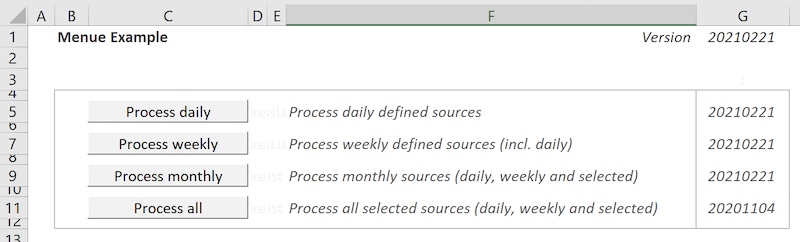
1. color on a worksheet in cells like buttons and name them
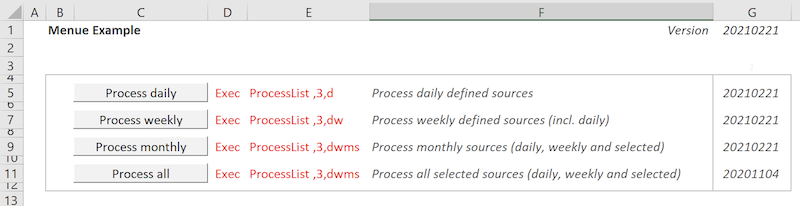
2. in the right cell write Excec in the cell if you like to get an action at double click
( you can hide this column laster or take the textcolor white)
3. next cell right side enter the whished procedure/functioname
then a , (coma) followed by 1st parameter - for every further
parameter again a , followed by the parameter
(also this column you can later hide)
4. next cell right side enter some short description
5. next cell right let empty to write last execution date back
6. Go to the Visual Basic windows and open the worksheet from the list
7. Enter the VBA Procedure "Private Sub Worksheet_BeforeDoubleClick(..."
8. Open a Module or use an existing and enter the procedure "Sub OpExecProc(..."
9. Make sure you have the procedures or functions as named in the cell
Sub OpExecProc(strProc$, Optional strParam$)
' Function: Call another procedure with some parameters
'           Be aware all parameters will be handovered as string - use byval or take strings
' Input:    Procedure name and parameters separated by ,
' Output:   (call the procedure)
    If strParam$ = "" Then ' no parameter
        Application.Run strProc$
    Else
        Dim bytParam As Byte
        strParam$ = "," & strParam$
        bytParam = Len(strParam$) - Len(Replace(strParam$, ",", ""))
        ReDim arrParam$(bytParam)
        arrParam$() = Split(strParam$, ",")
        Select Case bytParam
            Case 1: Application.Run strProc$, arrParam$(1)
            Case 2: Application.Run strProc$, arrParam$(1), arrParam$(2)
            Case 3: Application.Run strProc$, arrParam$(1), arrParam$(2), arrParam$(3)
            Case 4: Application.Run strProc$, arrParam$(1), arrParam$(2), arrParam$(3), arrParam$(4)
            Case 5: Application.Run strProc$, arrParam$(1), arrParam$(2), arrParam$(3), arrParam$(4), arrParam$(5)
            Case 6: Application.Run strProc$, arrParam$(1), arrParam$(2), arrParam$(3), arrParam$(4), arrParam$(5), arrParam$(6)
            Case 7: Application.Run strProc$, arrParam$(1), arrParam$(2), arrParam$(3), arrParam$(4), arrParam$(5), arrParam$(6), arrParam$(7)
            Case 8: Application.Run strProc$, arrParam$(1), arrParam$(2), arrParam$(3), arrParam$(4), arrParam$(5), arrParam$(6), arrParam$(7), arrParam$(8)
            Case 9: Application.Run strProc$, arrParam$(1), arrParam$(2), arrParam$(3), arrParam$(4), arrParam$(5), arrParam$(6), arrParam$(7), arrParam$(8), arrParam$(9)
            Case 10: Application.Run strProc$, arrParam$(1), arrParam$(2), arrParam$(3), arrParam$(4), arrParam$(5), arrParam$(6), arrParam$(7), arrParam$(8), arrParam$(9), arrParam$(10)
            Case 11: Application.Run strProc$, arrParam$(1), arrParam$(2), arrParam$(3), arrParam$(4), arrParam$(5), arrParam$(6), arrParam$(7), arrParam$(8), arrParam$(9), arrParam$(10), arrParam$(11)
            Case 12: Application.Run strProc$, arrParam$(1), arrParam$(2), arrParam$(3), arrParam$(4), arrParam$(5), arrParam$(6), arrParam$(7), arrParam$(8), arrParam$(9), arrParam$(10), arrParam$(11), arrParam$(12)
            Case Else: MsgBox "Can't execute " & strProc$ & " because of too many parameters" & vbNewLine & vbNewLine & "Procedure EcecProc had to be extended"
        End Select
    End If
End Sub
The required VBA in the worksheet itself the event procedure Worksheet_BeforeDoubleClick
Private Sub Worksheet_BeforeDoubleClick(ByVal Target As Range, Cancel As Boolean)
' Function: Event Action on the worksheet call a procedure based on a cell value definition
' Input:    N/A
' Output:   (call the procedure and write the timestamp in the cell behind the comment)
    Dim strVal$, strTimestamp$, strParam$
    Cells(Target.Row, Target.Column + 1).Select
    strVal$ = Cells(Target.Row, Target.Column + 1).Value
    If strVal$ = "Exec" Then  ' Only execute if it is liked
        strVal$ = Cells(Target.Row, Target.Column + 2).Value
        strParam$ = Right(strVal$, Len(strVal$) - InStr(1, strVal$, ","))
        strVal$ = Trim(Left(strVal$, InStr(1, strVal$, ",") - 1))
        strTimestamp$ = Format(Now(), "yyyymmdd")
        Cells(Target.Row, Target.Column + 4).Value = strTimestamp$
        ' Call the liked procedure
        OpExecProc strVal$, strParam$
    End If
End Sub